Your car, without opening the app
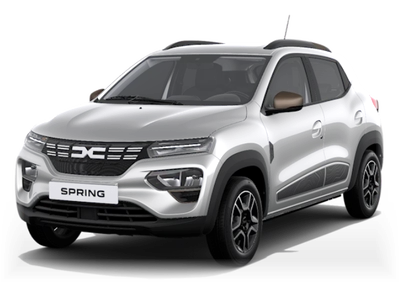
BobEV puts your Renault, Dacia or Alpine on the Lock Screen and the Home Screen. Here's what each part does.
AC button under the clock
One tap starts the AC, without unlocking the phone.
Start AC in a corner
Put it in place of the torch or camera, or in Control Center (iOS 18).
Battery and range
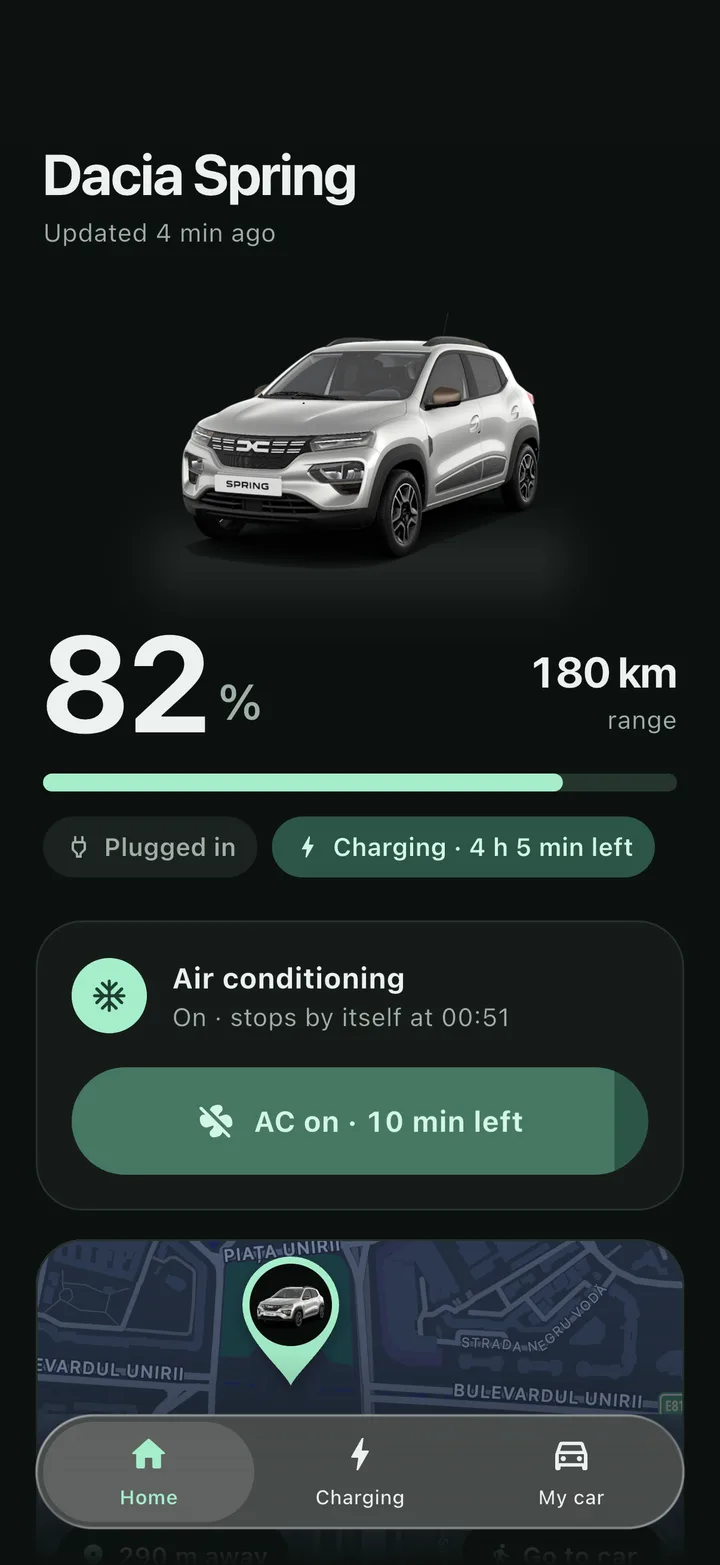
With a bolt while it charges, and the time it reaches 100%.
Last checked
When BobEV last asked the car. Tap the arrow to check again.
Start AC, then Confirm
Two taps on the Home Screen, so a long press never starts it by accident.
Coming soon to the App Store and Google Play

For iPhone and Android, where a 4×2 widget does the same. Free, with no ads.
Start the AC before you leave the house
Press Start AC in the app, on a widget or on the Lock Screen. BobEV confirms as soon as Renault accepts the request, then checks the car again: it says AC is on once the car has started it, or tells you if it didn't follow.
- On a Dacia Spring the AC runs for 10 minutes and BobEV counts them down.
- On models that accept a remote stop, like the Renault 5 or Megane E-Tech, a Stop AC button too.
- Long-press the app icon for a Start AC shortcut.
Every charge, even the ones Renault doesn't record
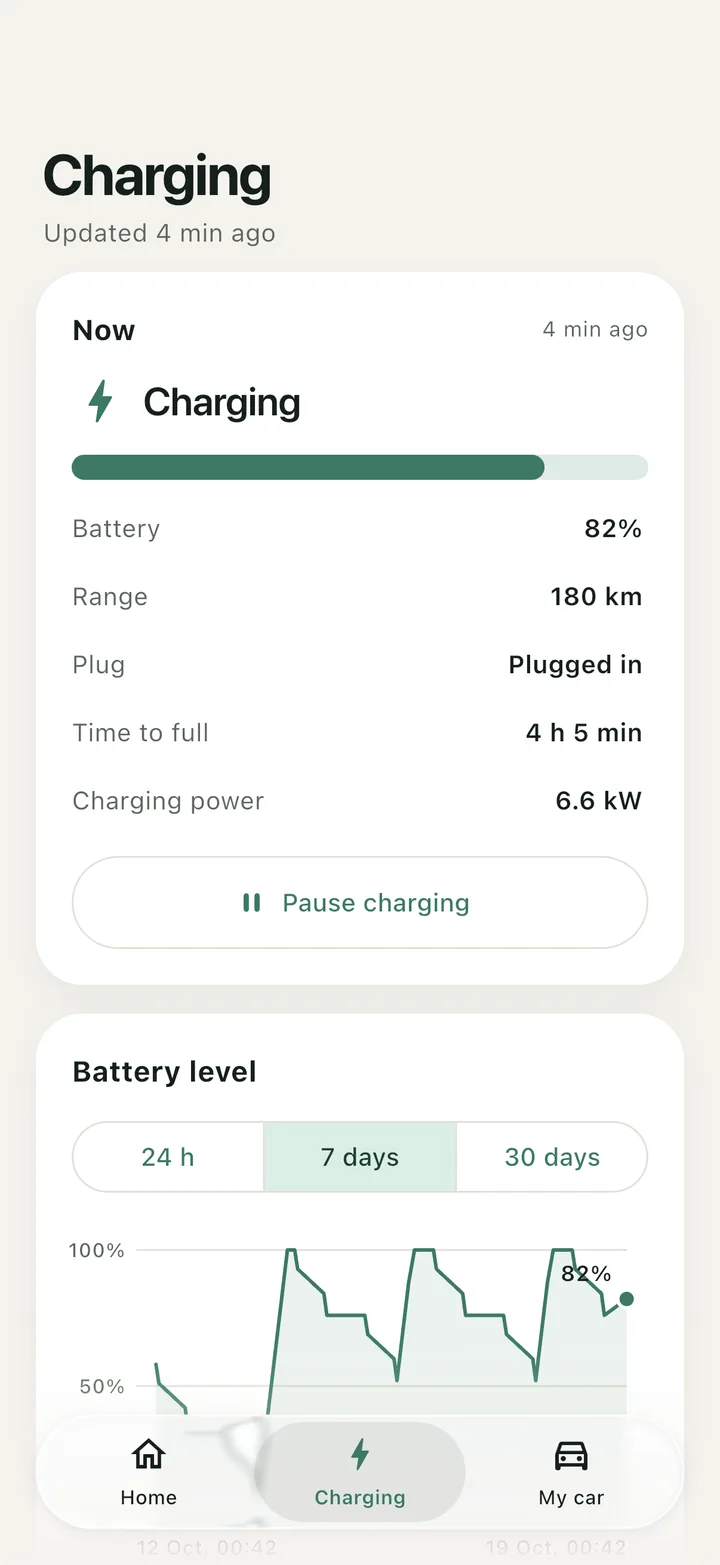
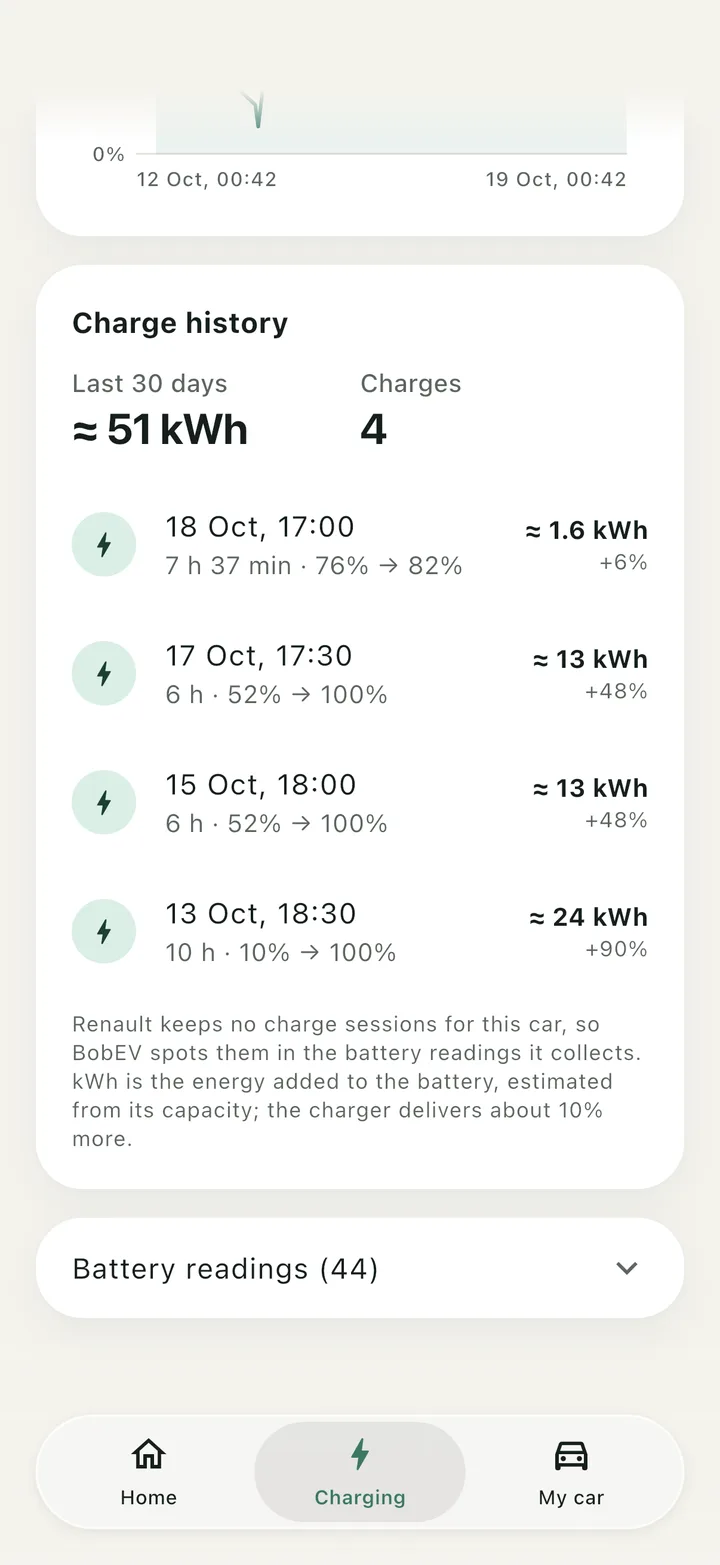
The Charging tab shows the charge level, time to full and charging power, a battery chart over 24 hours, 7 days or 30 days, and each charge with the energy it added.
- A 30-day total in kWh, and the number of charges.
- On cars where Renault keeps no charge sessions, like the Dacia Spring, BobEV finds them in the battery readings it collects, with the kWh worked out from your car's battery size.
- Pause and resume charging on a Dacia Spring.
Find your car with its own GPS
Tap GPS on the map and BobEV asks your car where it is right now, not just where it was last switched off. A countdown shows how long your car usually takes to answer.
- If the car has moved, the map shows where it was, where it is now and how far it went.
- You and your car on the same map. Go to car opens walking directions in Apple Maps or Google Maps.
- Your car's own picture on its pin, with the time its position was taken.
- GPS on request on the Dacia Spring, Renault 5 E-Tech and Alpine A290. Other models show where the car was last switched off.


Opens on your car, not on a loading screen
BobEV keeps the last data it saw on your phone, so it opens straight away and syncs in the background. Without a connection, it says how old the data is.
- Car data · 3 min ago under the car's name, so you know how fresh the numbers are.
- More than one car on your account? Tap its name to switch.
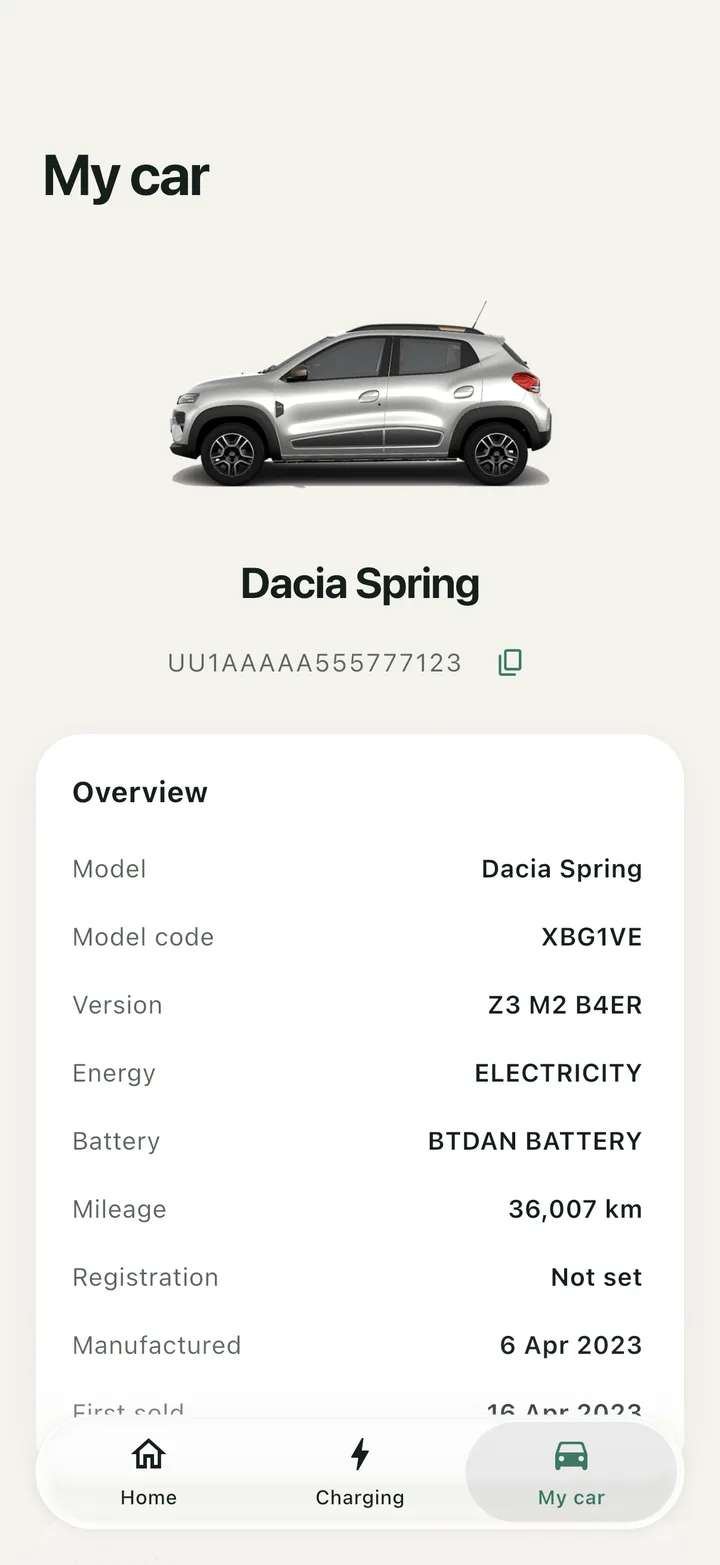
- My car lists the model, VIN, battery, warranties, connected services and every specification Renault returns.
- Only the features your model supports, so no button that does nothing.
- Light and dark mode, following your phone.
Start the AC without opening the app
Battery and range on your Home Screen, and the AC one tap away on your Lock Screen. The widgets send the request in the background.
- On iPhone, Start AC is also a control for Control Center and the Lock Screen corners (iOS 18 and later).
- On iPhone and Android, long-press the app icon for a Start AC shortcut.
Swipe to see the Lock Screen and Android.
iPhone Home ScreenSmall and medium widgets with battery, range and Start AC. iPhone Lock ScreenThe AC button under the clock, and Start AC in place of the torch. AndroidA resizable widget, from 2×2 to 4×2.
Set up in two minutes
- 1
Install BobEV
On an iPhone or an Android phone. A short tour shows what it does.
- 2
Sign in with your Renault Group account
The same email and password as MyRenault, MyDacia or MyAlpine. If Renault emails you a code, enter it in the app. No account yet? Create one from the sign-in screen.
- 3
Add the widget
Your car appears with its battery, range and AC button. Add the widget to your Home Screen, and the AC button to your Lock Screen.
Your password goes to Renault, and nowhere else
BobEV talks to Renault's services straight from your phone, the same ones the official apps use. There is no BobEV account and no BobEV server in between.
- Sign-in stays in the phone's vault
- Only a sign-in token is kept, in the iPhone Keychain or Android's encrypted storage. Never your password.
- Location stays on your phone
- It's used to show you next to your car. BobEV doesn't save it or send it anywhere.
- No ads, no tracking
- No advertising or analytics in the app, and no cookies on this website.
- Log out any time
- Logging out removes the sign-in token, the offline copy of your car's data and the widget data. Uninstalling removes everything.
Made for the Dacia Spring, ready for the rest of the family
Every car gets battery, range, plug and charging status, the battery chart and its details. Remote features depend on what Renault's services offer for each model, and BobEV only shows the ones that work.
Swipe the table sideways to see every feature.
| Model | Start AC | Stop AC | Car on the map | GPS on request | Charge history |
|---|---|---|---|---|---|
| Dacia SpringAC runs a fixed 10 minutes; pause and resume charging | Start AC: yes | Stop AC: no | Car on the map: yes | GPS on request: yes | Found by BobEV |
| Renault 5 E-Tech | Start AC: yes | Stop AC: yes | Car on the map: yes | GPS on request: yes | Charge history: yes |
| Renault 4 E-Tech | Start AC: yes | Stop AC: yes | Car on the map: yes | GPS on request: no | Charge history: yes |
| Renault Megane E-Tech | Start AC: yes | Stop AC: yes | Car on the map: yes | GPS on request: no | Charge history: yes |
| Renault Scenic E-Tech | Start AC: yes | Stop AC: no | Car on the map: yes | GPS on request: no | Charge history: yes |
| Renault Zoe (2019 and later) | Start AC: yes | Stop AC: no | Car on the map: yes | GPS on request: no | Charge history: yes |
| Renault Zoe (2013–2019) | Start AC: yes | Stop AC: yes | Car on the map: no | GPS on request: no | Charge history: yes |
| Renault Twingo E-Tech | Start AC: yes | Stop AC: no | Car on the map: yes | GPS on request: no | Charge history: yes |
| Renault Master E-Tech | Start AC: yes | Stop AC: yes | Car on the map: yes | GPS on request: no | Charge history: yes |
| Alpine A290 | Start AC: yes | Stop AC: yes | Car on the map: yes | GPS on request: yes | Charge history: yes |
Tested end to end on a Dacia Spring. Other models follow the features Renault's services list for them. Other connected Renault, Dacia and Alpine cars, including hybrids, can sign in too and get what their model supports.
Questions
Something else? Write to nicolae.elisei1999@gmail.com.
Is BobEV made by Renault or Dacia?
No. BobEV is an independent app, not made, sponsored or endorsed by Renault Group. It talks to the same Renault services the MyRenault, MyDacia and MyAlpine apps use, with your own account.
Which cars does BobEV work with?
Renault, Dacia and Alpine cars connected to a MyRenault, MyDacia or MyAlpine account: the Dacia Spring, Renault 5 E-Tech, Renault 4 E-Tech, Megane E-Tech, Scenic E-Tech, Zoe, Twingo E-Tech, Master E-Tech and Alpine A290, among others. BobEV only shows the features your model supports.
Do I need a new account?
No. Sign in with the email and password of your Renault Group account, the one you use in MyRenault, MyDacia or MyAlpine. If Renault emails you a verification code, you enter it in BobEV. If you don't have an account yet, the sign-in screen opens Renault's sign-up page for your country.
Is my password safe?
Your password goes only to Renault's sign-in service and is never stored by BobEV. The app keeps a sign-in token in the iPhone Keychain or Android's encrypted storage. BobEV has no server of its own, so your data never passes through one.
Why can't I stop the AC on my Dacia Spring?
The Dacia Spring can't stop its AC remotely: once started, it always runs for 10 minutes and then stops by itself. BobEV shows how long is left instead of a Stop button. Models that accept a remote stop, like the Renault 5 or Megane E-Tech, get a Stop AC button.
Why does the AC sometimes not start?
Renault accepts the request, but the car can still refuse it, for example when the battery is under the level the car needs for remote AC. BobEV checks the car again after each request: it says "AC is on" once the car confirms, and tells you when it didn't follow.
How does BobEV find my car?
Your car sends its GPS position to Renault when it's switched off, and BobEV shows it on the map with the time it was taken. On a Dacia Spring, Renault 5 E-Tech or Alpine A290, tap GPS on the map and BobEV asks the car for its position right now, with a countdown of how long your car usually takes to answer. If it has moved, the map shows where it was and how far it went. A car with no signal where it's parked, in an underground car park for example, may not answer, and BobEV tells you.
Can I use BobEV with more than one car?
Yes. When your Renault Group account has several cars, tap the car's name at the top of the Home tab and pick another one.
Why does BobEV say "Too many requests"?
Renault limits how often a car can be read. When the limit is reached, BobEV waits 15 minutes before asking your car again, and tells you from what time you can try.
How does BobEV show charges for a Dacia Spring?
Renault keeps no charge sessions for the Spring, so BobEV finds the charges in the battery readings it collects and estimates the energy added from the battery's capacity. The charger delivers about 10% more than the battery receives.
Can I start the AC without opening the app?
Yes. On iPhone there are small and medium Home Screen widgets, a Lock Screen button and a Control Center control (iOS 18 and later). On Android there is a resizable Home Screen widget. On both, long-press the app icon for a Start AC shortcut, with Stop AC on models that can stop it remotely.
Does BobEV cost anything?
No. BobEV is free, with no ads. If it grows, there may one day be an optional way to support it, and you'll always see the price before you pay anything.

Put your car on your Home Screen
Coming soon to the App Store and Google Play